You are here

Project Managment

Planning, PMP and primavera.

MSP 4.6 Adjusting Working Time for Individual Resource

Adjusting Working Time for Individual Resources

MSP2010 logo

This includes:
For each resource a specific project calendar can be set based on his working times like –standard, 24 hours, night shift or any customized calendar made for the project. Within the specific calendar set for a resource we can set up the individual resource’s schedule. We can mark holiday periods of the resource, change the working hours for a particular resource and also set the working / non-working days. All these are set on the calendar of the resource, but, no changes are made to the general base calendar which is common to the project.

Project Charter

Project Charter

Making Communication Level Easier and Well-Planned!

project charter

 
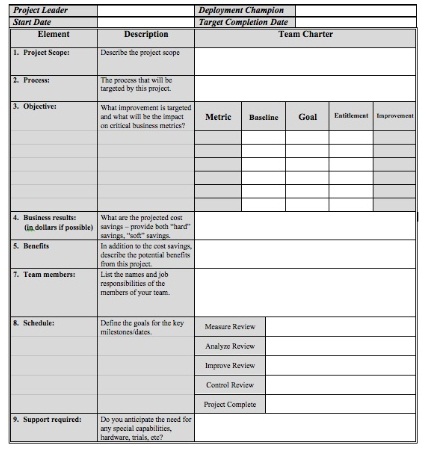
The project charter has been designed to define the DMAIC phases. It often lists out the details associated with the project title and the role of different Belt Levels, starting and ending date of the projects, benefits of the processes involved, areas of concern and several other measurements.
 
It is always vital to communicate about the project charter with all the people who are concerned about the process and project. There are some communication considerations which you should know before you do it.
 

MSP 4.5 Entering Pay Rates

MSP 4.5 Entering Pay Rates

msp2010

This includes:
1-Entering Resource Pay Rates for People Resources
2-Entering Resource Pay Rates for Equipment Resources
3-Entering Resource Pay Rates for Material Resources

There are different kinds of Rates which can be entered for different types of resources.
Standard Rate: For People and equipment, we can add the hourly/ daily, etc. rates in Standard rate. For Material, we can enter the cost of 1Unit here. This is disabled for Cost Resources as, for those values are directly entered at the task.

MSP 4.4 Entering Cost Resources

Setting Up Cost Resources

ms project 2010 logo

This includes:

1-What are Cost Resources

2-How to enter Cost Resource Names

A cost resource has only a cost value, no work related value. It does not have any time based parameters (like hrs.) associated with it. It also is not a consumable commodity. Eg. airplane tickets for travelling may be required for a particular task. These will incur a cost, but has work/ material related value. Thus, these don’t affect the scheduling also. These are added so that the such costs can also be tracked in the project plan. Other examples of cost resources can be costs for training, entertainment, dining, etc.

MSP 4.3 Entering Material Resources

Entering Material Resources 

ms project logo

This includes:

1-What are Material Resources
2-How to enter Material Resource Names

Material Resources are resources which get consumed during the project. . E.g in a construction project, bricks, concrete, paints, etc. would be material resources. So, when we enter a Material resource, then work based fields automatically get disabled. MS project takes an assumption that materials are available infinitely. i.e. the materials we add in the resource sheet can be assigned to any number of tasks.

MSP 4.2 Setting Up Equipment Resources


Setting Up Equipment Resources

This includes:

1-What are Equipment Resources

2-How to enter Equipment Resource Names

Equipment Resources are work based resources like people resources. E.g. for a task like excavation - excavator, backhoe etc. are the equipments. They are usually rented on per hour/ day / week basis. These can also have a cost per use. These are not added as Material resources because these are not consumed in the project process

Primavera P6

Primavera P6

Primavera p6

Introduction - Primavera p6 course

Primavera is a brand name under which several project management software packages are marketed. The current publisher of these packages is Oracle Corporation.
 
Primavera software application tools include:
• Primavera P3 and SureTrak Project Planner (discontinued December 31, 2010, use continues unsupported by Oracle)
• Primavera P6 Enterprise Project Portfolio Management
• Primavera P6 Professional Project Management
• Primavera P6 Analytics
• Primavera Portfolio Management
• Primavera Contract Management
• Primavera Risk Analysis
• Primavera Inspire for SAP
• Primavera Earned Value Management


MSP 4.1 Setting Up People Resources

Setting Up People Resources

in Microsoft Project 2010

ms project 2010

This includes:

1-Different Types of Resources
2-How to enter People Resource Names
3-About Initials and Grouping

MS Project defines three basic types of resources.
Work Resources – include people and equipment. For these, work is calculated in terms of time based units like, hrs, days, weeks, etc.
Material Resources – include materials. These get consumed in the progress of the project.
Cost Resources – These neither have an associated work nor get consumed. E.g., travelling costs, training costs, etc.

MSP 3.7 Checking the Plan’s Duration

Checking the Plan’s Duration

This includes:
1-Checking start and finish dates
2- Autoscheduling
3-Checking Task Links
4-Checking Overall project Plan

For checking and scheduling the Project Plan, we can take the following systematic steps:

MSP 3.6 Documenting Tasks

Documenting Tasks

ms project logo

This includes:

1-How to get the notes column

2-How to enter notes for a task

For documenting information related to a task, information can be added in the Notes for a particular task. All tasks with notes are shown marked with an icon on the indicator column. These notes can be formatted and printed also.

Pages

Subscribe to RSS - Project Managment