
Main menu
You are here
How to install module in drupal 7

Drupal is a free and open source content management system (CMS) and content management framework (CMF) written in PHP and distributed under the GNU General Public License. It is used as a back-end system for at least 1.5% of all websites worldwide ranging from personal blogs to corporate, political, and government sites including whitehouse.gov and data.gov.uk. It is also used for knowledge management and business collaboration. Modules are plugin or addon in the core drupal system to give extra features or options.
How to install module in drupal 7
Choose the module file
- Choose the right release. When you have chosen a module to add to your site, you must choose which release to use. The version must be compatible with your version of Drupal. Note that 'Development releases' are versions of the module that are in an active stage of development. They may be written for a previous/current/future version of Drupal, are considered unstable, and should be handled with care. 'Recommended releases' are stable and ready to use.
- Access the files. If you plan to manually install, download the .tar.gz or .zip file to your computer and skip down to 'Install manually.' If you plan to install through your site's interface, either download to your computer or copy the URL for the file, then proceed to the next section.
Install through the Drupal interface
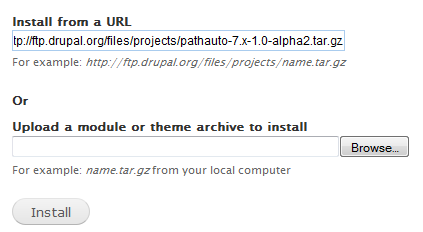
A note about FTP: If FTP is not enabled for your server, and you try to install via URL, you may receive an error message. Drupal will not be able to diagnose the problem, only tell you that there is one. It's up to you to determine whether your server is properly configured for FTP.
Install manually
Please note: Especially for sites with a lot of additional modules, many people have begun to further divide the modules folder, to help stay organized. A typical way of doing this would be:
Enable and configure
Please note: You can only have one copy of a module with the same name in each Drupal site. The module's name is determined by the name of the .module file, not by the name of the directory.
Tip: If you run into problems, search the module's issue queue and the forums. If your problem hasn't already been addressed, post a question or issue and someone will try to help you out.
Tip: To keep up-to-date on any issues and fixes related to your newly installed module(s), you can create a user account on Drupal.org (if you haven't done so all ready) and then subscribe to the feed of each module you are using.
-
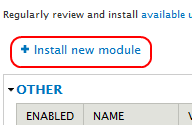
Navigate to the install page. New in Drupal 7 is the ability to install modules and themes directly through the site's interface. Navigate to Modules > List (tab), or
http://example.com/admin/modules, and click the link 'Install new module.' -
Follow the prompts. You will be prompted to provide either the URL to the download, or to upload the .tar.gz or .zip file from your local computer. Click 'Install', and the Update manager will copy the files into your
sites/all/modulesfolder. (See Update manager for more information about what the that core module can do.) The next screen gives you two links. Click 'Enable newly added modules' and skip down to the 'Enable and configure' section.-
Extract the files.The downloaded module package will be in a compressed file format such as 'tar.gz'. On Windows, use a program like 7-zip to extract the files. On modern Mac systems, double-click the .tar.gz file. For *nix systems, use the command line:
tar -zxvf modulename-drupalversionnumber.tar.gz
You should see a list of files extracted into a folder. -
Upload the folder.
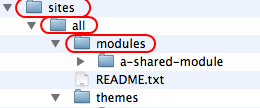 Transfer your files with SFTP or FTP to the desired modules folder in your Drupal installation (or if you are using version control, add and commit them to your code repository). The modules folder at the top level of your Drupal installation is reserved for Drupal core modules (the ones that come with the original download of Drupal). Contributed modules belong in
 sites/all/modules. If you are running a multi-site installation of Drupal, usesites/my.site.folder/modulesfor modules there that are specific to a particular site in your installation. Modules that will be shared between all sites should be placed insites/all/modules. -
sites/all/modules/contribfor all contributed modules. -
sites/all/modules/customfor all custom modules. -
sites/all/modules/featuresif you have additional modules that were created usingFeatures. - Read the directions. If the module has an installation file (usually INSTALL.txt and/or README.txt), read it for specific instructions. There are modules that require special treatment, and even modules that depend on other downloaded files to function properly. Sometimes the README file has no .txt extension. If you double-click it, your computer won't know what program to use. In that case, open a text editor first, and then open the file using the editor's 'file open' command.
-
Enable the module. Navigate to Administer > Modules or
http://example.com/admin/modules. Check the 'Enabled' box next to the module and then click the 'Save Configuration' button at the bottom. Note: If you are updating an existing module, you'll need to click 'update script' at the top of the page or loadhttp://www.example.com/update.php, then click 'Continue' (after making a backup of both your database and 'sites' folder). -
Set up permissions. Some modules will require that you change permissions to get them working. Permissions information may be in the instructions that came with the module. Navigate to Administer > Modules and click on the 'Permissions' button for the desired module.
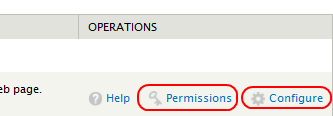 You can also do this on the Permissions page (Administer > People > Permissions). Scroll down to see if the module appears in the list and, if it does, give the appropriate permissions to desired roles.
 - Adjust settings. Most modules will have some type of settings page. It will vary from module to module but if not described in the README.txt file, it can usually be located by navigating to (Administer > Modules) and clicking on the 'Configure' link for that module. Not all modules have settings pages.
-
Extract the files.The downloaded module package will be in a compressed file format such as 'tar.gz'. On Windows, use a program like 7-zip to extract the files. On modern Mac systems, double-click the .tar.gz file. For *nix systems, use the command line:
Source: drupal.org
How to install module in drupal 7
Copyright© 2010-2012 Grook network
sitemap | Privacy Policy
Follow us on: 


